WhatsApp Lead Management: How to Capture, Qualify & Follow Up Leads | ChatKar
Learn how WhatsApp lead management works, from lead capture and qualification to assignment, follow-ups, automation, tracking and conversion.
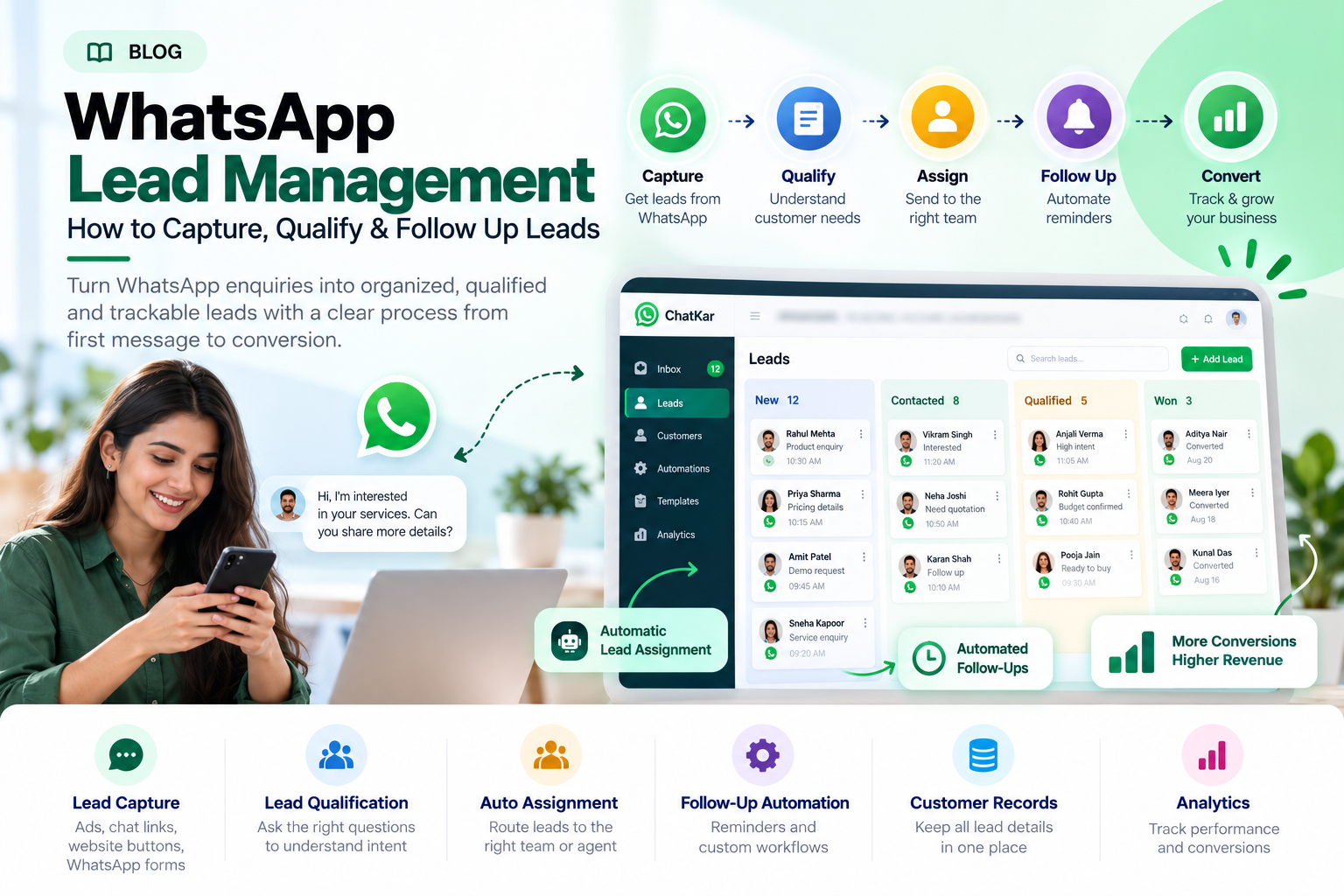
WhatsApp Lead Management: How to Capture, Qualify & Follow Up Leads
WhatsApp can generate a large number of customer enquiries, but receiving leads is only the first step. Businesses need a repeatable way to capture, qualify, assign, follow up and track those leads.
WhatsApp lead management connects incoming conversations with customer records, sales teams, qualification questions, follow-up workflows and reporting.
This guide explains how WhatsApp lead management works, the most useful lead-capture methods, qualification, routing, automation, follow-up, tracking and the mistakes businesses should avoid.
Quick Answer: What Is WhatsApp Lead Management?
WhatsApp lead management is the process of capturing, organizing, qualifying, assigning, following up and tracking leads that come through WhatsApp.
The goal is simple: make sure a useful enquiry does not get lost inside a chat history.
Bring the enquiry into the sales workflow.
Understand the customer's need and intent.
Send the lead to the right person.
Keep the next action visible.
Measure what happens after the enquiry.
Why WhatsApp Leads Get Lost
Most businesses do not lose leads because WhatsApp cannot receive them. They lose leads because the process after the first message is inconsistent.
Leads Stay Inside Chats
Nobody creates a clear record of the enquiry.
No Ownership
Several employees see the lead but nobody clearly owns it.
Follow-Up Is Forgotten
The first response happens but the second or third contact never happens.
No Visibility
Managers cannot easily tell how many leads are open or qualified.
The WhatsApp Lead Management Journey
A simple lead journey can look like this:
New lead
Create record
Understand need
Owner
Next action
Won / Lost / Later
7 Ways to Capture Leads on WhatsApp
Click-to-WhatsApp Ads
Customers can move directly from an advertisement into a WhatsApp conversation. This removes friction between discovering a business and starting an enquiry.
Website WhatsApp Buttons
Add WhatsApp entry points to product pages, landing pages and contact pages.
WhatsApp Chat Links
Share trackable WhatsApp links across social media, email, brochures, QR codes and other campaigns.
WhatsApp Forms
Ask qualification questions inside a structured WhatsApp experience rather than relying only on free-form chat.
QR Codes
Offline campaigns, packaging, events, stores and printed materials can direct prospects into WhatsApp.
Social Media CTAs
Instagram, Facebook and other channels can use WhatsApp as the next step from content or campaigns.
Existing Customer Referrals
Existing customers can start conversations on behalf of new prospects through a shared or trackable entry point.
ChatKar currently lists Meta Click-to-WhatsApp ads, WhatsApp Forms and trackable WhatsApp chat links among its features. :chatgpt-content-reference{index="1"}
How to Qualify WhatsApp Leads
Lead qualification should collect only information that helps the business decide what happens next.
What product or service does the person need?
Is budget relevant to this purchase?
Does the customer need something now or later?
Is geography important to the product or service?
Why is the customer looking for the solution?
Does the enquiry need immediate attention?
"Which service are you interested in?" → "When are you planning to start?" → "Which city are you located in?" → "Our relevant team member will contact you."
Assign Each WhatsApp Lead to the Right Person
After qualification, the lead should have a clear owner. Assignment can be manual or automated depending on the system.
Distribute new leads across available agents.
Route enquiries to sales, support or another queue.
Route by city, state, region or market.
Send specialized leads to product specialists.
ChatKar currently lists auto-assignment routing rules as part of its WhatsApp workflow capabilities. :chatgpt-content-reference{index="2"}
WhatsApp Lead Follow-Up: What Should Happen Next?
One of the biggest advantages of a lead-management system is that the next action does not have to depend entirely on someone's memory.
Example Lead Follow-Up Timeline
For business-initiated WhatsApp messages outside the applicable customer-service window, businesses need approved message templates under the current WhatsApp Business policy. WhatsApp also requires clear escalation options when automation is used during the 24-hour window. :chatgpt-content-reference{index="3"}
What Parts of WhatsApp Lead Management Should Be Automated?
Good Candidates for Automation
- Welcome messages
- Basic qualification questions
- Lead routing
- Reminders
- Status updates
- Common FAQs
- Lead tagging
Better for Human Agents
- Price negotiation
- Complex requirements
- High-value leads
- Objections
- Custom quotations
- Escalations
- Closing conversations
The right balance is usually not maximum automation. It is automation of repetitive work plus fast access to a human when the conversation needs judgment.
Create Clear WhatsApp Lead Statuses
Lead statuses make it easier for a team to understand what is happening without reading every conversation.
WhatsApp Lead Management Metrics
Lead management becomes much more useful when managers can measure what happens after the first message.
How many enquiries are arriving?
How quickly does someone respond?
What portion of enquiries become qualified leads?
How many qualified leads receive follow-up?
How many managed leads become customers?
Which campaigns generate useful enquiries?
Manage WhatsApp Leads With ChatKar
ChatKar currently brings lead capture, customer conversations, team inboxes, auto-assignment, flow automation, WhatsApp Forms, Click-to-WhatsApp, chat links and analytics into the same platform. :chatgpt-content-reference{index="4"}
Capture enquiries from WhatsApp entry points.
Route leads to the correct agent or team.
Build structured customer journeys.
Create additional WhatsApp lead-entry points.
Track messaging and customer activity.
The benefit is keeping customer communication and lead operations inside the same workspace instead of moving information manually between several tools.
WhatsApp Lead Management Best Practices
Define a realistic response process for new enquiries.
Qualify without turning the chat into a long form.
Make responsibility obvious.
Let the system handle predictable steps.
High-value or complex leads should reach people quickly.
Track lead quality and conversion, not just message volume.
Common WhatsApp Lead Management Mistakes
A lead record without an owner can still get ignored.
Long questionnaires can reduce the quality of the conversation.
Qualified leads often need several interactions before making a decision.
Some conversations require a human salesperson.
More leads do not automatically mean better sales results.
WhatsApp Lead Management and Customer Data
Lead management involves customer information, so businesses should think about consent, privacy, access controls and how customer data is used.
WhatsApp's current Business Policy requires businesses to obtain appropriate notices, permissions and consent for collecting, using and sharing customer information, and it places restrictions on requesting or sharing certain sensitive information. :chatgpt-content-reference{index="5"}
Frequently Asked Questions
What is WhatsApp lead management?
It is the process of capturing, organizing, qualifying, assigning, following up and tracking leads that come through WhatsApp.
How can I capture leads from WhatsApp?
Common entry points include Click-to-WhatsApp ads, website buttons, WhatsApp links, QR codes, forms and social media CTAs.
Can WhatsApp leads be automatically assigned?
Yes. Compatible platforms can use routing rules to assign leads based on factors such as team, workload, location or product.
Can I automate WhatsApp lead follow-ups?
Yes. Compatible systems can automate supported reminders, journeys, routing and other follow-up workflows.
Can WhatsApp Forms help with lead capture?
Yes. WhatsApp Forms can collect structured information inside a WhatsApp experience. ChatKar currently lists WhatsApp Forms among its features. :chatgpt-content-reference{index="6"}
What is the difference between WhatsApp lead generation and lead management?
Lead generation is about acquiring enquiries. Lead management is what happens after the enquiry arrives: capture, qualification, ownership, follow-up and outcome tracking.
Should every WhatsApp lead be automated?
No. Automate repetitive tasks while keeping human handling available for complex, high-value or sensitive conversations.
Can WhatsApp lead management connect with a CRM?
Yes. API-based platforms can connect WhatsApp lead workflows with CRM and other business systems through supported integrations.
Does ChatKar support WhatsApp lead management?
ChatKar currently lists lead capture, auto-assignment routing, WhatsApp Forms, Click-to-WhatsApp, chat links, flow automation and analytics among its capabilities. :chatgpt-content-reference{index="7"}
Related WhatsApp CRM & Sales Guides
Final Thoughts
WhatsApp lead generation can bring customers to your business quickly, but lead management determines what happens after the first message.
A strong process does not require every interaction to be automated. It requires every lead to have a clear path:
Capture → Qualify → Assign → Follow Up → Track → Convert
That is the foundation of a scalable WhatsApp lead-management workflow.
Once this process is structured, businesses can decide where automation, AI, CRM integrations and human sales involvement should fit.
Turn WhatsApp Enquiries Into Managed Leads
Capture leads, qualify enquiries, assign conversations, automate follow-ups and track customer journeys with ChatKar.
Explore Features View Pricing